Who said it will kill desktops? X11 desktops still work fine. And some specific tools like screen recorders are not workflows. Wayland had issues with some tools, those get solved and some people use it and are happy with it. Other people don’t use it and are equally happy. Why try to invent some apocalypse when there’s none?
These just-so stories are easy to write, harder to write convincingly. I gladly use Wayland because I’m in a mixed-DPI setup, and didn’t rely on anything that broke. But loads of people are still pissed off due to persistent incompatibility.
The way Wayland made everything the responsibility of non-existent compositors really fucked over anyone not using GNOME or KDE, basically.
It is a different ecosystem. It requires time to mature and yes, you have to migrate to it in order to use it.
Moving to Wayland was a bit like moving to a different operating system from an application point of view. The toolkits made that reasonably easy for most apps but they really do not help much if you are the window manager.
So yes, compositors had to be built. This was easy enough for the big projects like GNOME and KDE but a bigger ask for smaller players. But there are lots now: GNOME, Plasma, Hyprland, MangoWC, Niri, COSMIC, Budgie, LxQT, LabWC, Wayfire, Sway, DWL, River, Wayland Maker, etc. I am sure there are many more I don’t know or forgot. There will be lots more.
And yes, a Wayland compositor is a bit like the X server and window manager combined. So, they are harder to build. Except libraries have appeared to do that. There are wlroots, Smithay, aquamarine, Louvre, and SWC. There will be more. So, a Wayland compositor is not really that much harder anymore. And it will get easier.
The XFCE project is just starting a Wayland compositor project now. It will be built mostly by a single developer. They think they will have a dev release in a few months. They are using Smithay.
Building the Wayland ecosystem took time. But we are basically there. And it is only going to get bigger and better.
The transition would have been a lot less acrimonious if it had been attempted after wlroots was usable, or if people working on Wayland itself had made an effort to write something like wlroots.
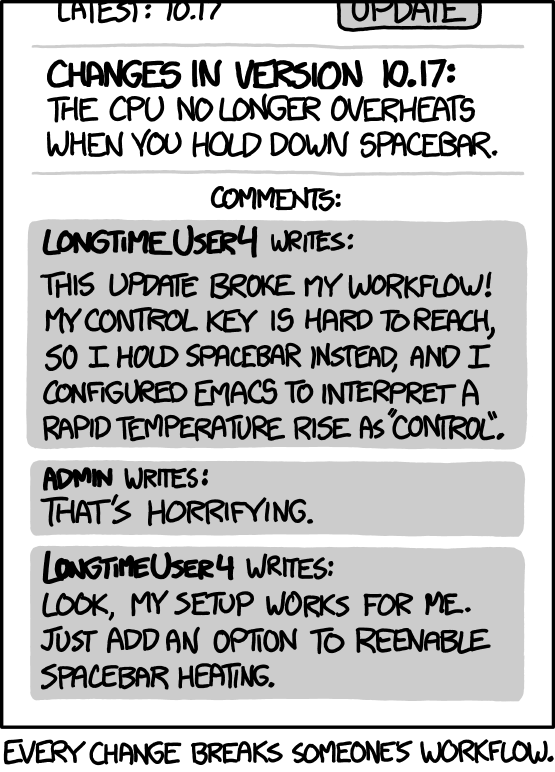
wayland didn’t remove spacebar heating. Wayland removed the spacebar
So you’ll always get heating, without having to press the spacebar, no?
Better
Took a while, but Wayland is basically at a point now where it generally just works. I’m glad I don’t really need to deal with weird tearing issues or the X server not starting for whatever esoteric reason after a driver update anymore.
Wayland is a protocol, and major desktop versions like gnome and Kde implementation sucks balls…
Desktop crashes, oh there goes all my applikations that I started, gnome can’t keep up with switching workspaces because doesn’t fucking register the release key event. Fuck me dude xorg had no issues with switching windows or crashed barely crashed, gnome crashes 2 times a day. Oh sorry dude you want to use a custom screenshot tool, sorry dude, can’t allow that, have to do some weird workaround.
Oh you want change keybindings, no sorry dude can’t don’t support it.
Oh you wanted to automate window/workspace switching via scripts, you have inject fucking JavaScript into our runtime to query windows ids and state…
Jesus what joke of an implementation, it’s the anti theist of Linux. Everyone got fooled and allowed GUI developers implement the rendering backend…
And the best of all: hey do you want make software for Linux, sorry you app doesn’t work in KDE because the whole implementation of functionality you’re using is different from other Wayland implementation, can you plz fix in kde and gnome?
Why don’t you just stick to X if you think it is better?
Of course, the rest of us have moved on to Wayland because we disagree with you.
No need to fight though. Have fun.
“I have an issue with wayland waaa its so bad”
pulls of the mask
Its an issue with gnome.
Every. Single. Time.
Its far better to have compositing the actually works vs the borked shit xorg has. Forcing every desktop maker to share the terrible stagnant base that was xorg is not the linux way. You’ve chosen to use an opinionated desktop that doesnt have the features you want. These arent hard to implement, a child was able to implement all those features by themselves in a few years.
Lmao, I didn’t choose gnome I’m forced to use it, Wayland sux balls. If you are talking about the buggy mess that is hyprland give me a break.
There was a lot of development happening around x server via extension to it, composite, xrandr, xrender. Stuff was being moved out of the x server and into the kernel. So what if, it was a heap of legacy, so is the Linux kernel. Shit worked and it worked good enough. The only thing that made it stagnant was forcing everyone to adopt Wayland, because of being afraid to be left behind.
Now canonical and red hat decides what should be part of the protocol, great isn’t. They cant even have a broad consensus leaving everyone to guess how shit should implemented.
Features: x11 Performance: x11 Tooling: x11 User friendly: x11 Multiscreen support: Wayland (but they also fucked upp with limitations due the protocol decisions they made)
Desktop crashes, oh there goes all my applikations that I started
I’m using KDE with a 1080ti. My desktop regularly crashes (it’s some hardware issue, pretty sure my 1080ti is on its way out). I never lose any of my open applications. All that happens is the wallpaper goes black, the panels disappear. Then about 5 seconds later the wallpaper and panels reload like nothing happened. Sometimes a panel widget will be “stuck” in a loading state, but opening then closing its settings refreshes it.
Aside from that no issues. And no crashing on any of my other systems with KDE.
I have kde + Wayland on Arch, and everything works just fine even with my Nvidia card. About 1.5 years ago there was a
bugbig Wayland update that changed it from literally unusable to good but maybe a little buggy. Now it’s as stable as anything I’ve ever used.I use spectacle for screen shots without issue. Switch windows, desktops, snapping windows, etc works perfect for me. Other features you mentioned I can’t personally speak to, but not having all of the features on a rolling release is to be expected with anything. It’s early phases were bad though.
I have KDE + Wayland on Arch using an Nvidia GPU and I have tons of nagging issues that seemingly cannot be resolved with current drivers.
More power to you if it all just works, but that isn’t universal
That’s unfortunate. Idk what I did but it’s just worked for me for a long time now. I definitely feel in the minority with having success with an Nvidia GPU. I run 3 monitors, 1 vertical, one an ultra wide, and one on top. It remembers position, colors and refresh are on pont and other than needing to restart Steam from time to time, it’s just worked for me. My next card will still not be Nvidia though.
The event loop shit is a gnome issue I have, I haven’t tried it with KDE but I wouldn’t be surprised if the issue remains, where if you are switching windows/workspace to often the gnome event loop doesn’t register that you have released the key because it’s to busy fucking rendering the window/ Workspace switch.
We obviously don’t have the same use case, so if it works for you all power to you. But it sucks balls, the way I like use my laptop when I’m working. Can’t even do simple shit as to rebind a key, please find a working guide for kde or gnome, surprise they don’t work, and it’s fucking baffling the amount of different guides of how change keybindings and how many steps they require you do to, but they even work, why is that?
Why doesn’t Wayland support fucking a config file, where you define key bindings, why does it not allow to copy shit from the terminal via xclip or any other method, it’s like we went back 50 years in time, dude these tools existed 25 years ago.
Wtf is this, it’s lacking so much functionality and also performance is worse, you get more performance from xserver like 20% more fps, just try playing a game and turn on the fps meter, and compare them. Wtf is this, how do you build something new based on prior knowledge but it’s worse.
https://superuser.com/questions/1189467/how-to-copy-text-to-the-clipboard-when-using-wayland#1377550 In KDE, you can rebind the keybinds for anything, it’s under system settings in the keyboard section, I’m not really sure what you’re talking about. You can add custom ones to run any command, too, if the app doesn’t register a keybind, so you could, for example, send a dbus signal to the app. The way it’s done in wayland is different, but KDE supports all the stuff you mentioned in wayland from what I can tell.
It works so bad in KDE, and no I don’t want to use GUI to bind keys, I want to save the configuration and use if I need to reinstall. I tried to rebind changing keyboard layout, doesn’t work.
Sorry dude, but it works horribly bad
So, it does work, just not the way you would prefer it to?
No because it crashes bro, key events aren’t properly registered, getting ghosted keys or whatever the term is, when it’s to busy rendering the window animations or Workspace animations.
I’ll tell you what, it’s super convenient for red hat/IBM or whoever else is paying for the development of gnome and KDE development to install spyware, because now everything goes via Wayland protocol.
I get very good fps in every game I play on my 2080ti that’s very much not new. I’ve had to download a fix for one game I have, and Sony doesn’t allow multiplayer in Ghost of Tsushima, but every other game literally loads and runs better than they ever have. 100fps+ in most games, and maybe less than 60 in the most intense. Arch + kde + Wayland is easily the best computing experience I’ve ever had.
I didn’t say Wayland had bad performance, if you read I said that x11 has better performance. For Wayland being new and more modern it should not underperform and dude just fucking look benchmarks online, you have internet.
Here this one is for free, how you candy read. https://www.dedoimedo.com/computers/wayland-vs-x11-performance-amd-graphics.html
I’ve had no performance degredation moving to Wayland after the aformentioned update. I read what you said. I’ve noticed no difference in performance, and anyone that’s fretting about 120 fps vs 110 fps is just splitting hairs for the sake of be being pedantic. I concede that there are some features that don’t exist that don’t apply to me and the vast majority of users, but for most of us, Wayland is just as good if not better in some common aspects.
No need to be hostile my dude. Chill.
Na I’ll always be hostile it’s more fun, I would less hostile if people stop the with telling what works for them, like I’m going to fucking get the same setup as dem. You do understand that there’s more angles than one, and not stopping and thinking yourself about the issue at hand and making weird assumptions without looking up anything, is kinda annoying after a while.
Because that is how most people are on Lemmy, it’s so hard to just have a discussion because you always have some people make counterpoints that fucking suck ass, and not based in anyone else’s reality but their own.
If I wouldn’t be hostile I would just stop writing, and it’s not like I’m angry, it’s just sounds funnier.
Well I don’t have GTX 2080ti, and I don’t like my computer sounding like wind turbine for playing a 7 year old game, so those performance benefits means something to me.
Gnome works great for me using Wayland.
Yeah sure, if you don’t anything with it
I use my PC for everything from digital art, music production, and video editing to 4k gaming without issue. I bet you have an nvidia GPU don’t you?
I use an Nvidia GPU with GNOME and Wayland and everything works great for me.
Yep, but my laptop I use the igpu
Well I hope one day you can enjoy Wayland.
Tbh I dont enjoy any OS I actually hate computers, they are in the way of what I’m trying to do, it’s just an interface to do something else. But when the interface is effecting your experience to much it’s just sad.
Unreasonably funny
I’m using gnome rn and it doesn’t crash much anymore. When I used xorg, there’d be crashes that brought down the entire desktop (or the computer as a whole) too. Also, generally every time I have a crash now it’s from using xwayland to play a game and having certain extensions enabled at the same time (although those issues seem to have disappeared recently too). All the other issues I either don’t care about or are supported with some extra work. For gnome, some of the issues are just because they have a phobia of exposing settings and you need to use stuff like dconf to deal with it.
Jesus what joke of an implementation, it’s the anti theist of Linux. Everyone got fooled and allowed GUI developers implement the rendering backend…
As you mentioned earlier, it’s a protocol. Implementation issues are due to how gnome/kde/whatever implemented their compositors. I think it’s pretty much standard for Linux given that stuff like systemd and flatpak exist. If you want to use something more traditional unix-y, maybe you should use a bsd or solaris derivative or something.
I think it’s pretty much standard for Linux given that stuff like systemd and flatpak exist. If you want to use something more traditional unix-y, maybe you should use a bsd or solaris derivative or something.
That’s a pretty toxic take, much in the way like Windows does things.
I mean the person I’m responding to seems to want a traditional Unix experience given how they’re talking (and given they use suckless software). Linux generally isn’t that, and it never really has been (or at least hasn’t for many years). If you want something more traditional, there are a bunch of available options like the BSDs. If you insist on using Linux, you can use distros that don’t use Wayland, systemd, flatpak, etc., but the support for them is lower, and if you need to use something that isn’t packaged for example you’ll need to deal with getting it working with e.g. systemd on your own. A bunch of software makes assumptions that stuff like systemd is now included if you use Linux. I’m currently using a distro without systemd and am seriously considering swapping back to my old one because it’s such a hassle.
Admitedly, i’m currently in a “take a step back” phase and like to see software breaking. It’s healthy for the linux ecosystem if things break.
And in software that is a hassle (usually Gnomes on a not-Gnome environment) either the software itself is really good and somebody made a patch or packaged a old working version already. Or i look for something simpler to do the same.
I still use x11 with suckless dwm, but for work I’m forced to use Ubuntu 25.10 gnome shit. It’s a sad state. Gnome owns all the process you start via gnome, that is why if gnome dies all the child process es dies as well, genius. Because the buggy mess, doesn’t critical errors and never will have…
I don’t know how you use gnome, if it doesn’t crash for you, fine, good. But that’s not my reality, it can crash because I open the laptop screen while being on an external monitor. It can crash because I’m screen sharing, it can crash because some software I used froze, it can crash for random reason (doesn’t happen often, but still annoying).
I still use x11 with suckless dwm
I can tell from the way you write, no need to mention it.
No worries, I would like you to have it in written statement.
kde crashes don’t exit your applications, kde crashes everytime my pc goes into sleep mode and it preserves the apps
It’s fine. There’s still some quirks with Wayland I don’t like. Either having to be in a game or have Discord focused in order for push to talk to work for example. Some mouse constraint issues with certain games that for whatever reason KDE has been able to figure out but every other wayland compositor hasn’t.
Just in case it helps:
My Discord keybinds were having a struggle when I used 3rd party apps like armcord and vesktop. The actual Discord bin program is doing global keybinds correctly for my toggle mute microphone on my keyboard.
I use the Discord Nix pkg, not armcord or vesktop. I’ve always had this issue be it on arch, nixos, or fedora. I’m starting to lean towards “user error” as I just must not have something set up right. but yeah I’ve never used armcord, vencord, or vesktop.
Sorry I have never looked into the specifics, but I read some way for flatpaks to listen for specific keybinds even in the background, it’s mostly a permissions thing IIRC.
Sorry I’m assuming bazzite Fedora as well.
tried it on arch, nixos, fedora both native pkgs and flatpaks. no dice. push to talk only works when either in a game or when discord is focused. all via various wayland des/wms be it KDE, Niri, Sway, Hyprland, etc
it’s absolutely not fine. You as a user, should be able to access the content of any window on your machine.
By that, do you mean that every program running with your user privileges should be able to access the content of every window on your machine?
This article reads like AI slop. Lots of repetitive vague exposition. No concrete examples. The concept is alright, but it lacks any technical meat.
I was getting that AI vibe a bit as well, but there are parts that also felt human enough that made me question my gut feeling. I’m not terribly familiar with the XDA site itself, but having looked it up just now, they seem to cover AI a lot in their articles in a positive light, so I’d say it’s quite likely the writer used AI to write it, and then tweaked it a bit.
Knowing that, I’m considering deleting this post…
It got some good conversations going though.
It is XDA developers after all
Damn that 30 year old protocol for sneaking up on people.
The title of this article is a refreshing take on the Wayland vs X thing. I’ve had Wayland on my lunar lake PC and battery life nearly doubles with Wayland in-use. I can also have multiple monitor and resolution setups without issue at all. I had to use X unfortunately for a presentation I was recording and everything was just scaled terribly wrong.
I’ve had þe opposite experience. I have a laptop I ran X on for years. Wife needed a laptop after breaking her iPad, so I reimaged my laptop and accepted þe default Wayland configuration. Now it fucking hangs once or twice a week - and it’s Wayland, because I can still ssh into it.
I’m going to configure it to use X and uninstall Wayland.
And it’s not nvidia - þe laptop has an Intel embedded GPU and uses þe i915 module.
Worked perfectly fine under X for years; regularly hangs under Wayland.
How come you’re using that symbol instead of the letters th?
Wayland is pure trash. It’s written like an Android App. Just short-sighted garbage.
I’ve discovered this once on my own, I had a complex control remapper and that I had been evolving into a horrific bash hydra of hacks over many years. I briefly tried to get it working when I switched to Wayland. I don’t remember which component broke me, but it went something like this:
“Hey, I wonder why doesn’t this thing work in Wayland. I wonder if I can whip up a pale imitation.”
10 minutes of stack overflow searches later…
“Oh… oh no.”Which desktop are you using and what are you trying to do?
KDE Plasma. I want context sensitive mouse button macros depending on the active window and, if its librewolf, the site in the active tab. I am currently using libratbag/ratbagctl for the remapping, but I’m changing ratbagctl profiles manually.
“I tried to keylog myself and the system doesn’t support keylogging.” is a frustrating situation. Because it’s neat from a security perspective and absolutely maddening from basically every other one.
Not sure that’s a good thing.
It’s my own system and I’m root of it, if I want to run a program that inspects every bit of thing, including keylog myself I should be perfectly able to do it.
This kind of limitations are fake security, because Wayland is as secure as the rest of the stack it lies on top, it can’t add any more security than what Linux itself can guarantee. So yes, I can still read dev input and keylog myself anyway, it’s just more frustrating.
I have been using OSX since it was born because it was an amazing UNIX system and a convenient user environment. I moved back to Linux as my daily driven when they started introducing a tons of blockers to whatever I wanted to do “for security reasons”. “Oh you want to debug your own software?” “Nah, I can’t allow you to trace state of another process, I don’t care you are root” and so on…
People use windows because it has decades of backwards compatibility sort of.
That should be:
People
useused windows because ithashad decades of backwards compatibility sort of.Nowadays: it has current compatibility sort of.
Microsoft is a mess now, so it’s no surprise that their current Windows version is also a mess.
For the most part they just didn’t update.
See XP usage.